![OmniByte - PNG Black Logo Oct 2021 (1).png]](https://help.omnibyte.com/hs-fs/hubfs/OmniByte%20-%20PNG%20Black%20Logo%20Oct%202021%20(1).png?height=50&name=OmniByte%20-%20PNG%20Black%20Logo%20Oct%202021%20(1).png)
Branding Updates
We’ve introduced subtle branding updates to better align FormsPro with OmniByte’s visual identity. You’ll notice a refreshed logo featuring the signature green mobius, creating a stronger connection between the two.
This updated look appears anywhere you see the FormsPro icon, such as the app launch button and browser favicon. We’ve also updated the default color palette, swapping red for green as the secondary color, which will carry through to app store listings as well.
These are purely visual enhancements—everything you rely on works exactly the same. If you’ve customized your theme, your settings will remain unchanged.
Multi-Language Support
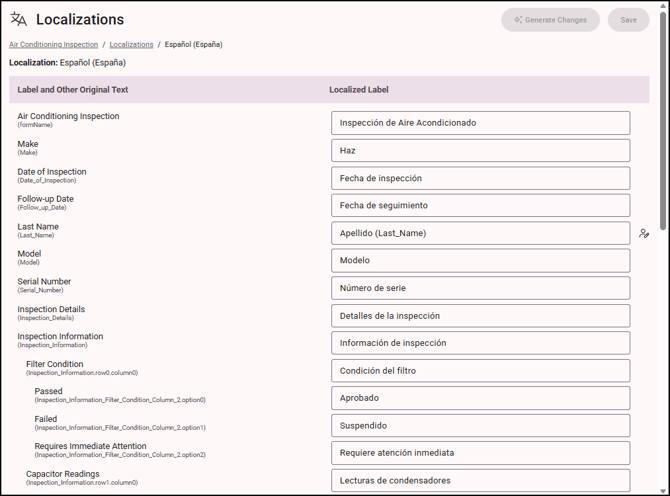
FormsPro is now fully multilingual, making it easier than ever to support global teams.
- Admins can change the language of the Admin site in 19 languages
- AI-powered translation helps you quickly deliver forms in users’ preferred languages
- Forms automatically display based on device language and regional settings
- Reports can be delivered in the recipient’s preferred language for a seamless experience
- Map translated reports from the Data Maps page
Seamless integrations with IFS Cloud
We’ve expanded our IFS Cloud integration with enhanced deep linking:
- Form status is now included when using a callback URL
- You can add merge fields directly within the callback URL
We’ve also introduced improved document revision control, giving you more flexibility in how documents are managed. You can now upload reports as new files or maintain them as controlled revisions within your existing workflows.
Configuration is simple within the Data Map:
- Document Format defines how files are categorized
- Document Revisions toggle lets you enable or disable revision tracking
These updates provide better visibility, cleaner version control, and more streamlined document management.

Entra Capabilities for SCIM
In this release, managing users just got easier. With Microsoft Entra SCIM support, you can now handle user provisioning and access control from a single, centralized system.
- Automatically provision, update, and remove users
- Manage permissions without logging into the admin site
- Align with enterprise-grade identity management standards
This means less manual work, improved security, and more consistent access control.
Alternate Photo Gallery
You now have flexible options when using an IFS Cloud connection for managing existing media in forms:
- Remove from Form – Keeps the file in IFS Cloud but removes it from the form
- Mark as Obsolete – Updates the file’s status in IFS Cloud
- Delete from IFS – Permanently removes the file (with confirmation)
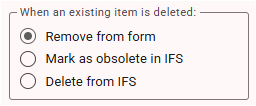
These options mirror IFS Cloud’s native behavior for a consistent experience.
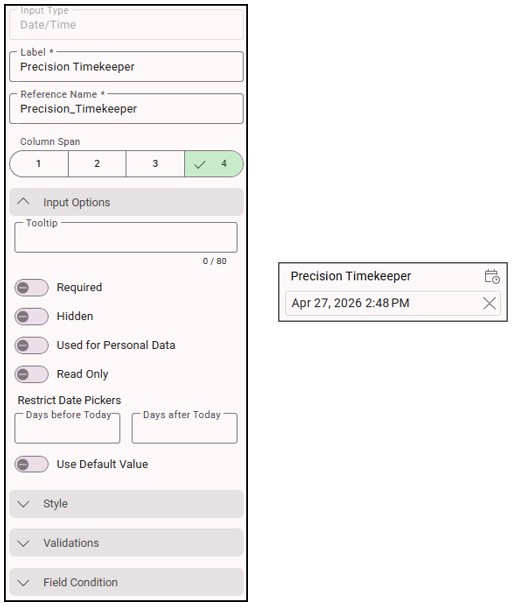
New Date/Time Input
The new Date/Time input captures the date and time in a single field based on a user’s local time zone. The Date/Time input stores the value the same as a Date/Time Stamp input, but unlike the Date/Time Stamp input, the Date/Time input is editable.
Date/Time inputs follow the ISO 8601 standard for consistent formatting across systems.
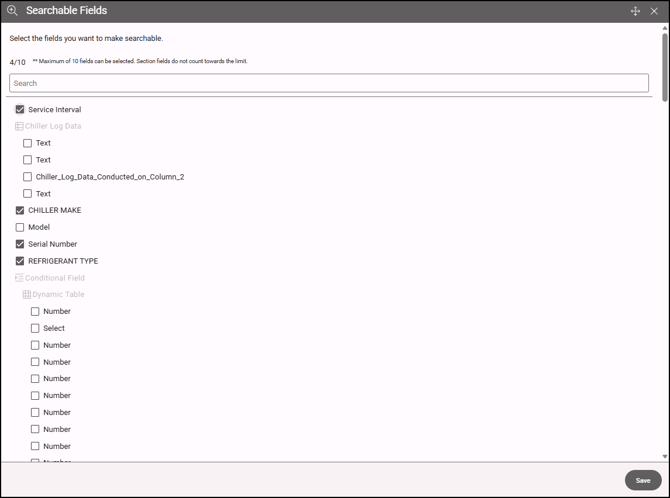
Select Fields that are Searchable within Data
Searching through submissions is now quicker and more efficient.
- Select up to 10 key fields to prioritize in searches
- Improves speed and accuracy—especially for large datasets
- Applies across View/Edit Submissions, Pending Forms, and Data Maps Log
By default, Form Name, Submitted By, and Submission Date are already indexed—and don’t count toward your limit.
Focus on the most relevant fields to get the best performance and faster results.