![OmniByte - PNG Black Logo Oct 2021 (1).png]](https://help.omnibyte.com/hs-fs/hubfs/OmniByte%20-%20PNG%20Black%20Logo%20Oct%202021%20(1).png?height=50&name=OmniByte%20-%20PNG%20Black%20Logo%20Oct%202021%20(1).png)
The Summary Settings section of the repeatable group input slider allows you to calculate values across all instances of a repeatable group. These summary fields aggregate numeric data from repeated fields or table columns and can be referenced by calculated fields outside of the repeatable group.
This functionality is useful when a form contains multiple repeated groups and an overall total, average, minimum, or maximum value is needed.
The following summary calculations are available for numeric fields and table columns within a repeatable group along with an example of the reference name format:
-
Sum: Returns the total of all numeric values across every repeat of the group.
Reference Name Format:
GroupReferenceName_FieldReferenceName_SUM - Average: Returns the average of all numeric values across every repeat of the group.
Reference Name Format:
GroupReferenceName_FieldReferenceName_AVERAGE - Minimum: Returns the lowest numeric value across every repeat of the group.
Reference Name Format:
GroupReferenceName_FieldReferenceName_MIN - Maximum: Returns the highest numeric value across every repeat of the group.
Reference Name Format:GroupReferenceName_FieldReferenceName_MAX
Reference Name Guidelines:
- Reference names can be edited to create shorter, more meaningful names.
- It is recommended that the summary suffix (
_SUM,_AVERAGE,_MIN, or_MAX) remain part of the reference name so the calculation type is easily identifiable. - If duplicate field names exist within a repeatable group, reference names follow the standard duplicate naming convention by appending an incrementing number.
Summary fields are available for use in calculated fields outside of the repeatable group. They provide a convenient way to summarize data entered across multiple group instances without requiring additional calculations.
Common use cases include:
- Calculating a grand total from values entered in multiple repeatable groups.
- Summing values from tables contained within each repeatable group.
- Displaying the highest or lowest value entered across all repeats.
- Calculating an average value across all repeated entries.
For example, a repeatable group is used to capture equipment inspections. Each repeated group contains a table with a Total Cost column.
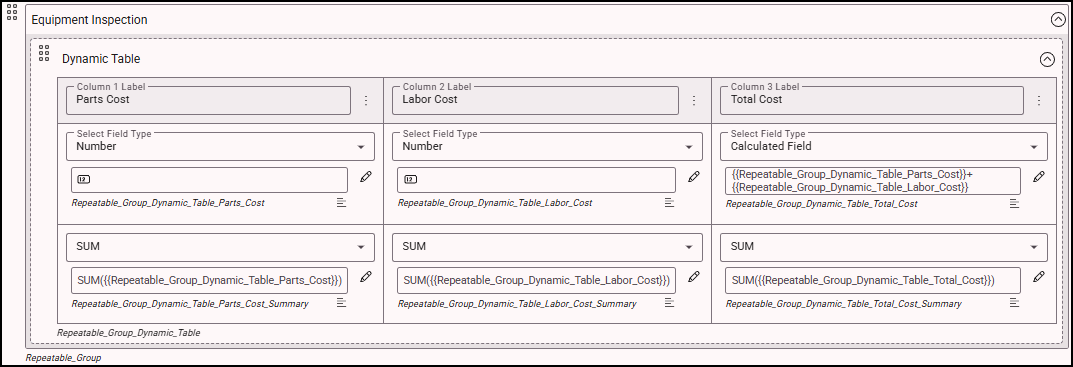
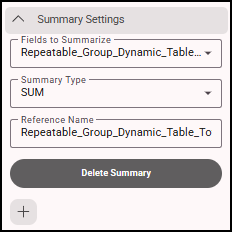
In this example, the Repeatable_Group_Dynamic_Table_Total_Cost_Summary field is used to summarize with a summary type of SUM and a reference name of Repeatable_Group_Dynamic_Table_Total_Cost_Summary_SUM.
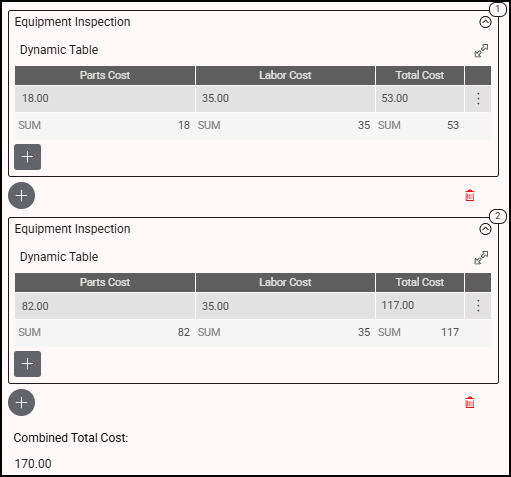
A calculated field outside the repeatable group can display the combined total cost for all equipment inspections entered on the form.
Notes
- Summary settings are available only for numeric fields and table columns.
- Summary fields calculate values across all repeats of the repeatable group.
- Summary fields are intended to be referenced outside of the repeatable group, typically in calculated fields used for overall totals and reporting.