![OmniByte - PNG Black Logo Oct 2021 (1).png]](https://help.omnibyte.com/hs-fs/hubfs/OmniByte%20-%20PNG%20Black%20Logo%20Oct%202021%20(1).png?height=50&name=OmniByte%20-%20PNG%20Black%20Logo%20Oct%202021%20(1).png)
The Multiline and Word Wrap options are available in the Behavior section of a control's properties in the Report Designer. While both settings affect how text is displayed in a report, they serve different purposes.
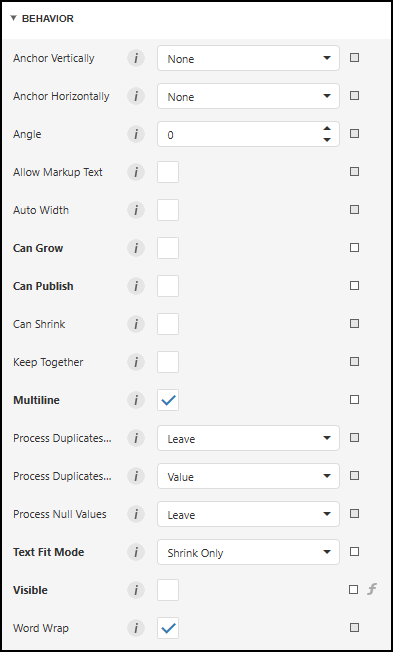
The Multiline option controls whether the report honors line breaks that were intentionally entered by the user in the source data. When enabled, any carriage returns or line breaks included in the input value are preserved and displayed in the report.
For example, if a user enters text into a Long Text field on a form and uses Shift + Enter to create multiple lines, enabling Multiline on the corresponding report control will display those line breaks exactly as entered. If Multiline is disabled, the line breaks may not be displayed, causing the text to appear as a single continuous line.
The Word Wrap option controls how text is displayed when it exceeds the width of the report control. When enabled, text that is too long to fit within the control's horizontal boundaries automatically wraps onto additional lines.
In most cases, the control will expand vertically as needed to accommodate the wrapped text, preventing content from being cut off in the report. This allows longer values to remain fully visible without requiring the control to be widened.
Multiline preserves line breaks that already exist in the data, while Word Wrap creates additional line breaks automatically when the text is too long to fit within the control's width. These options can be used independently or together, depending on how you want text to be displayed in your report.