![OmniByte - PNG Black Logo Oct 2021 (1).png]](https://help.omnibyte.com/hs-fs/hubfs/OmniByte%20-%20PNG%20Black%20Logo%20Oct%202021%20(1).png?height=50&name=OmniByte%20-%20PNG%20Black%20Logo%20Oct%202021%20(1).png)
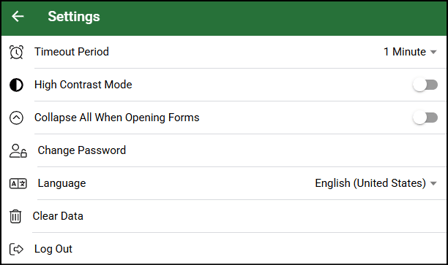
You may need to switch the mobile app from one environment to another—for example, when performing tests in one environment (test site) and later submitting forms in a live environment (production environment). To change environments, either uninstall and reinstall the mobile application or clear the application’s data on the device. To clear the data, select Settings from the More menu, then select Clear Data.
After completing one of these steps, reopen the app, enter the appropriate registration key for the environment you want the mobile app to connect to. You will then be prompted to enter your username and password.