![OmniByte - PNG Black Logo Oct 2021 (1).png]](https://help.omnibyte.com/hs-fs/hubfs/OmniByte%20-%20PNG%20Black%20Logo%20Oct%202021%20(1).png?height=50&name=OmniByte%20-%20PNG%20Black%20Logo%20Oct%202021%20(1).png)
Use the Edit Folder window to change, rename or delete a folder. Renaming a folder does not affect the forms inside it. Deleting a folder removes only the folder itself. No forms are deleted. Any forms in the folder are automatically moved to the main Forms list.
- From the Form and Report Designer menu, select Add/Manage Folders. The Folders page opens.
- From the Folder Name list, select the folder you want to edit or delete to open the Edit Folder window.
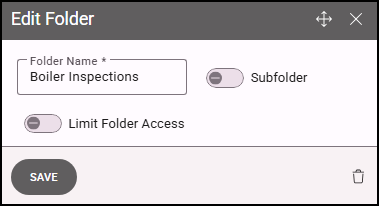
- Rename the folder. The new name appears in the folder list on the left.
- Make any necessary changes to the subfolder or the folder access.
- To delete the folder, click the trash can icon. If you delete a folder that contains subfolders, those subfolders are deleted too.