![OmniByte - PNG Black Logo Oct 2021 (1).png]](https://help.omnibyte.com/hs-fs/hubfs/OmniByte%20-%20PNG%20Black%20Logo%20Oct%202021%20(1).png?height=50&name=OmniByte%20-%20PNG%20Black%20Logo%20Oct%202021%20(1).png)
The Data Sets page provides a central view of all existing data sets. Use the Edit Data Set tray to manage a data set's details, including its name, description, and folder, or delete a data set when it’s no longer needed.
- From the Reusable Components menu, select Data Sets. The Data Sets page opens.
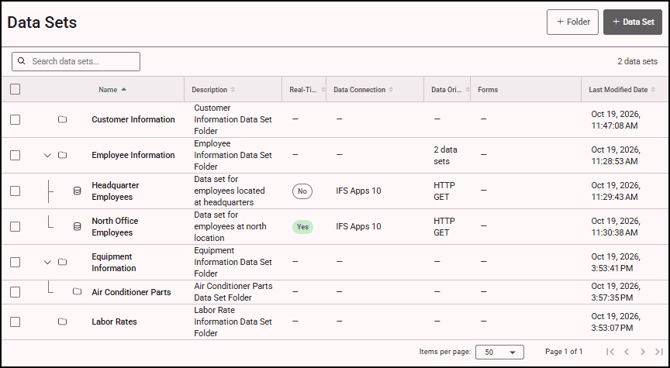
- Click on the data set you want to edit or delete to open the Edit Data Set tray.
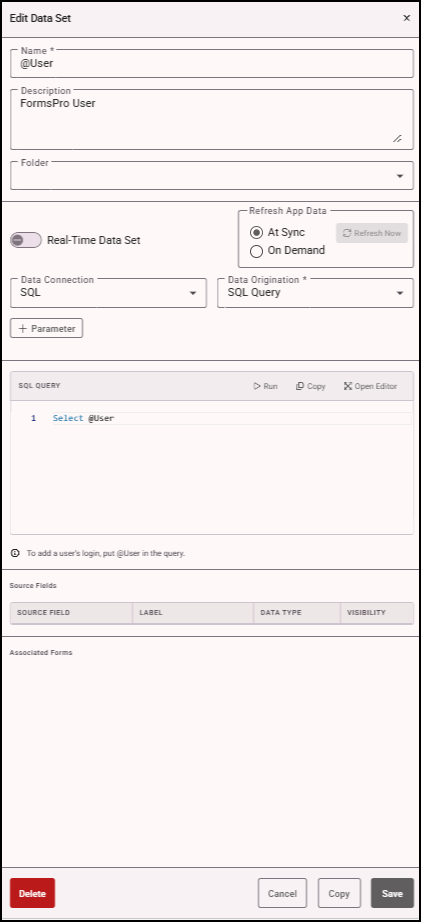
- Edit the data set as needed.
- Click Save to apply your changes.
- To delete the data set, click Delete. Confirm the deletion when prompted.