![OmniByte - PNG Black Logo Oct 2021 (1).png]](https://help.omnibyte.com/hs-fs/hubfs/OmniByte%20-%20PNG%20Black%20Logo%20Oct%202021%20(1).png?height=50&name=OmniByte%20-%20PNG%20Black%20Logo%20Oct%202021%20(1).png)
The Data Sets page provides a central view of all existing data set folders. Use the Edit Folder tray to manage a folder’s details, including its name, description, and parent folder, or delete a folder when it’s no longer needed.
- From the Reusable Components menu, select Data Sets. The Data Sets page opens.
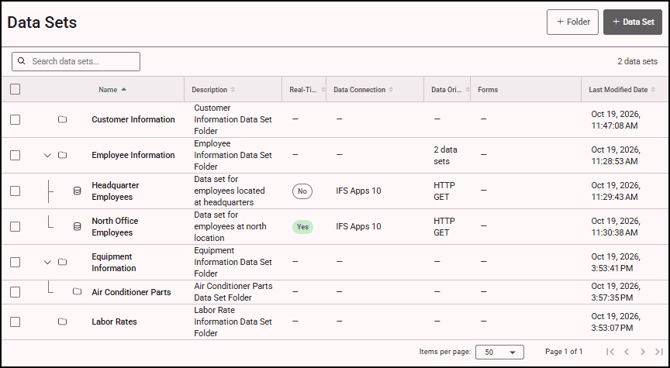
- Click on the folder you want to edit or delete to open the Edit Folder tray.
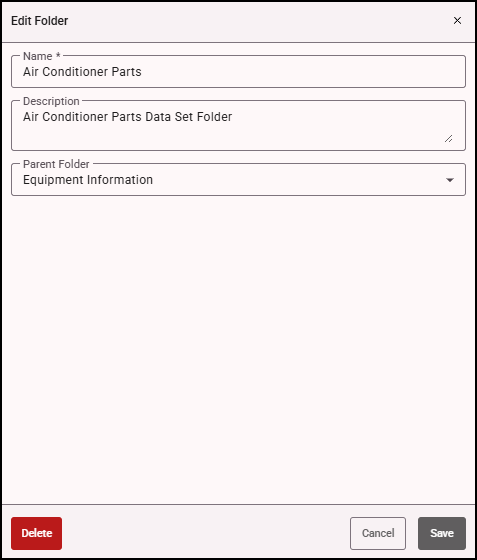
- To edit the folder, update the Name, Description, or Parent Folder field as needed. Review your changes to ensure the folder is correctly named and organized.
- Click Save to apply your changes.
- To delete the folder, click Delete. Confirm the deletion when prompted.
Note: Deleting a folder also deletes all subfolders it contains. Make sure you no longer need the folder or its subfolders before deleting it. Any data sets contained in the folder are moved out of the folder and are not deleted.